
Fast Todo Entry for Tomorrow.do
Overview
The Do it (Tomorrow) Browser Extension streamlines task management by enabling rapid input of simple to-dos directly from the browser interface. Designed for users who rely on the Do it (Tomorrow) platform, it eliminates the need to navigate away from the current webpage to log tasks. This tool is ideal for professionals, students, and digital organizers who frequently jot down ideas, assignments, or follow-up actions while browsing.
By integrating seamlessly with the main application, it enhances workflow continuity and reduces task entry friction. The extension supports quick additions through a dedicated browser button, keyboard shortcuts, and context menu integration. It also syncs with the user’s main task list, ensuring consistency across devices when used alongside the full app.
Real-world usage includes capturing meeting notes, saving research links, or scheduling personal tasks without interrupting workflow. The developer, Adylitica, has focused on simplicity and efficiency, aligning with modern productivity demands.
Key Features & Capabilities
- Super fast todo entry – Add tasks in seconds using a single click or keyboard shortcut, minimizing workflow disruption.
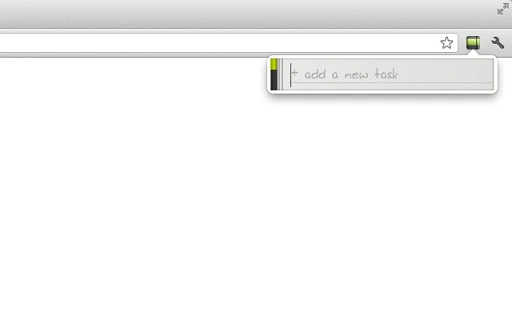
- Simple interface – Minimalist design with no clutter; users only need to type what needs to be done.
- Quick access to full task list – Click the left side of the extension icon to open the complete list of tasks.
- Today’s tasks badge count – Toggle a visual indicator showing the number of pending tasks for the current day.
- High-resolution icon support – Optimized for retina and high-DPI displays for a crisp visual experience.
- Real-time sync with tomorrow.do – Automatically updates the web app when both the extension and the full app are in use.
- Shift+Enter to schedule for tomorrow – Pressing Shift+Enter while adding a task moves it to the next day’s list.
- Text selection integration – Highlight text on any page and use the right-click context menu to convert it into a to-do item.
- URL bar shortcut – Type
t spacein the browser’s address bar to instantly create a new task from the current URL.
These features are particularly useful during research sessions, online meetings, or content consumption, where tasks are frequently identified but often forgotten. The extension reduces cognitive load by allowing users to capture ideas instantly, improving task retention and planning accuracy.
User Interface, Workflow & Performance
The extension’s interface is compact and unobtrusive, designed to blend into the browser toolbar without distracting from the user’s workflow. The icon is clearly visible and responsive, with a clean layout that supports high-resolution screens. Navigation is intuitive: clicking the icon opens a small input field, while the left side triggers access to the full task list.
The workflow is streamlined—users type a task, press Enter, or use a shortcut, and the entry is logged immediately. No additional steps or confirmation prompts are required, which enhances speed and reduces friction. The developer did not specify resource usage details, but based on general behavior of lightweight browser extensions, it is expected to consume minimal CPU and RAM.
Stability is likely maintained through regular updates, though exact performance metrics were not provided. The extension operates offline for task creation, with syncing occurring once the user reconnects to the internet. No reported issues with crashes or freezes were mentioned.
Compatibility & System Requirements
The extension is compatible with Windows, Mac, and Linux operating systems, making it accessible to a broad range of users across different platforms. It is designed for use with modern web browsers, though specific browser versions were not listed. The installation size is 2.3 MB, indicating a lightweight footprint that won’t significantly impact system storage.
The developer did not provide additional system requirements, such as minimum RAM or processor specifications. Compatibility information is limited to the supported operating systems. Users should ensure their browser supports Chrome extensions, as the functionality relies on browser-level integration.
The extension requires a connection to the Do it (Tomorrow) web service to sync tasks, meaning it functions best when paired with the full app. No known conflicts with other browser extensions were reported.
Pros and Cons
Pros
- Extremely fast task entry with multiple input methods
- Intuitive, minimal interface that doesn’t clutter the browser
- Seamless integration with the Do it (Tomorrow) web app
- Supports keyboard shortcuts and context menu actions
- High-resolution icon optimized for modern displays
- Free to use with no hidden costs
- Lightweight at just 2.3 MB
Cons
- Requires a connection to the Do it (Tomorrow) web service to function fully
- Dependent on the main app for full functionality and sync
- Some permissions are required for full integration, which may concern privacy-conscious users
- Not available for all browsers (only confirmed for Chrome-based environments)
- Limited to task creation; no editing or management features within the extension itself
FAQ Section
Is the extension compatible with all browsers?
The extension is designed for Chrome-based browsers. Compatibility with other browsers was not confirmed in the provided information.
Does the extension work offline?
Yes, tasks can be created offline. However, syncing with the main Do it (Tomorrow) app requires an internet connection to complete.
Are there any security risks with the permissions required?
The extension requires permissions to integrate with the Do it (Tomorrow) web app. While the developer has not provided a detailed security policy, users should review the permission list before installation to ensure trust.
How often does the extension update?
Regular updates are likely, as the developer has indicated ongoing development and responsiveness to user feedback. Specific update frequency was not disclosed.
Can I use this without the full Do it (Tomorrow) app?
The extension functions independently for task creation, but full synchronization and advanced features depend on using the main web app.
Final Thoughts
The Do it (Tomorrow) Browser Extension delivers a focused, efficient solution for users who need to capture tasks quickly while browsing. Its speed, simplicity, and integration with the main app make it a valuable addition to any productivity toolkit. While it lacks standalone management features, its core purpose—rapid task entry—is executed flawlessly.
The free model, lightweight design, and multi-platform support enhance its accessibility. Users who rely on the Do it (Tomorrow) ecosystem will find this extension indispensable. For those seeking a frictionless way to manage daily tasks from the browser, this tool offers a clear advantage.
Download Do it (Tomorrow) Browser Extension now.







